

The End of Microsoft’s Free Grace Periods: What the Extended Service Terms Mean for CSP Customers
Thursday 30th April 2026
Important Changes are Coming to Microsoft with Extended Service Terms (EST): Find out What CSP Customers Need to Know
If your business uses Microsoft cloud subscriptions through the Cloud Solution Provider (CSP) program, there’s an important change coming to how those subscriptions renew. Starting May 4, 2026, Microsoft is ending the free grace period that used to kick in when a subscription wasn’t renewed. In its place, Microsoft is introducing Extended Service Terms (EST), essentially a paid extension period that keeps your service running on a short-term, month-to-month (or even day-to-day) basis. Below we explain in plain English what EST means, what’s changing, and what you should make to stay on top of your renewals.
What Are Extended Service Terms (EST)?
Extended Service Terms is a new end-of-term option for Microsoft subscriptions. Think of it as a “paid grace period”. Today, if you don’t renew a CSP subscription and you’ve turned off auto-renew, Microsoft gives a temporary free grace period (30 days) before shutting off access. After May 4, 2026, that free period goes away. Instead, if a subscription reaches its end date and isn’t renewed or explicitly cancelled, it will enter Extended Service Terms: the service continues uninterrupted, but now it’s being billed monthly for the days you keep using it.
In short, EST ensures you won’t be abruptly cut off right after a subscription term ends, but you’ll pay for the continued service until you decide your next step (renew or cancel). Microsoft’s goal with EST is to make end-of-term management more predictable for everyone. Customers who keep using a service past the expiration contribute to its cost, and there’s no more ambiguity. At the same time, you always have control to stop the service if you don’t need it.
What’s Changing and When?
Here’s the timeline and key change to understand:
-
Up until now: When a CSP subscription expired and auto-renew was turned off, you effectively got a free grace period (generally 30 days) where the service stayed active. You could still renew during this time or take other action, and the customer wasn’t billed for that buffer period.
-
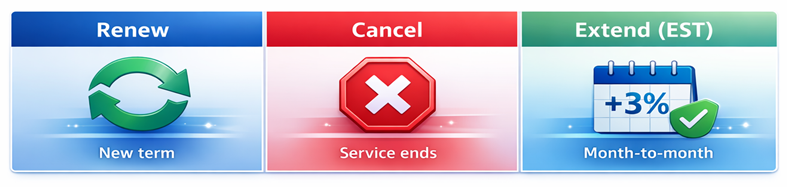
From May 4, 2026 onward: Microsoft is retiring the free grace period for eligible subscriptions (subscriptions purchased between 1 April 2025 and expiring or renewing after 4th May 2026). Instead, customers and partners must choose one of three options at the end of a subscription term:
-
Renew the subscription to a new term (standard renewal).
-
Cancel at expiration, service will stop immediately after the end date.
-
Move to Extended Service Terms (EST), meaning let the subscription continue month-to-month after expiration, billed at the monthly rate plus a 3% uplift.
If no choice is made in advance and auto-renew is off, Microsoft’s new default will be to automatically move the subscription into EST once it expires.
Key dates: This change doesn’t apply to every subscription overnight; it is tied to when your subscription was purchased or renewed:
-
April 1, 2025 – Eligible Subscriptions purchased or renewed on or after this date will be subject to the new rules once they expire.
-
May 4, 2026 – This is the enforcement date. Any eligible subscription expiring on or after May 4 2026, will use the new end-of-term options above. That means for many annual subscriptions, the first wave affected will be those that started mid-2025 or later.
Practically speaking, many businesses will start encountering EST in their late 2025 and 2026 renewals planning.
Who and What Does EST Apply To?
Applies to: Most license-based Microsoft cloud subscriptions. If you have Microsoft 365, Office 365, Dynamics 365, Power Platform, Windows 365, or other per-user or per-device subscriptions, those are in scope. It covers all term lengths and all customer segments under CSP. Microsoft is also extending EST to their direct channels.
Not applied to: Certain purchase types that don’t have an annual renewal structure. For example, Azure consumption or one-time purchases like perpetual software licenses or Azure reservations/savings. In short, if it’s a subscription service that used to benefit from a post-expiry grace period, it’s likely affected; if it’s a transaction with no renewal cycle, it’s not.
How Does Extended Service Term Work?
Let’s break down what happens if a subscription goes into Extended Service Terms:
-
Billing and pricing: In EST, the subscription switches to a monthly billing cycle. Microsoft will charge the current monthly rate + 3%. (or 23% if the subscription was on an annual commit.) You’ll be billed for each day the subscription remains in EST.
-
Service continuity: Functionally, nothing changes for end users. All the seats, services, and features of your subscription stay active. There’s no downtime or loss of access when entering EST. Microsoft designed EST specifically to avoid unintended service disruption, so by default they’ll keep things running to give you time to decide next steps.
-
No configuration changes: While in EST, you cannot make changes to that subscription’s details. It’s locked to the same seat count and product SKU as it had at expiration. You cannot add seats or upgrade it directly in EST, and you wouldn’t downgrade or remove seats either – it’s a temporary extension, not a flexible subscription. (You can still assign or remove users to those existing seats as normal, but you can’t increase the quantity of licenses.) This is important: if you foresee needing more licenses or a different plan, you shouldn’t linger in EST; you’d want to renew or purchase a new subscription to meet those needs.
-
Exiting EST: You can exit Extended Service Term at any time. There are two ways to exit:
- Cancel the subscription; If you do this, the service will go into a disabled state right away (users lose access immediately), and Microsoft will provide a prorated refund/credit for any prepaid days in the current billing period that won’t be used.
- Convert to a new standard subscription; Which means you decide to create a fresh subscription of the same product (possibly making changes like a different term length, different license count, upgrades, etc.). When you convert out of EST, the EST subscription ends (with a prorated charge up to that day), and a new subscription begins. Importantly, when starting a new term you can adjust seats or plans as required.
-
In either case – cancellation or conversion – you’re only billed for the days you stayed in EST. There’s no penalty for leaving early; it’s pay-as-you-go.
-
Duration: There is no time limit on how long a subscription can remain in EST. It will keep renewing until you or your partner acts. However, staying in EST for an extended period likely isn’t cost-effective due to the uplift. In practice, most organisations will either renew or cancel within a few billing cycles at most, rather than indefinitely paying a premium. Microsoft’s policy simply doesn’t force an auto-shutdown after X days; it puts the decision entirely in your hands.
What Should You Do Next?
As a Microsoft customer, here’s how you can prepare for Extended Service Terms and ensure a smooth transition:
1. Take stock of your subscriptions and renewal dates. Make a list of your current CSP subscriptions and their end dates. Identify which ones will fall under the new EST policy, knowing your timeline is the first step. Bytes customers can pull all of this via our Marketplace.
2. Decide your preferred action for each subscription. For every subscription, you’ll have the three choices (renew, cancel, or extend). Well before the expiration date, discuss internally and decide what you intend to do.
3. Check and set your renewal settings. At Bytes, by default, most of our customers are set to auto-renew. If you know you want to renew, leaving auto-renew on is simplest. If you know you want to cancel at term, you will set it to not auto-renew and indicate a cancel at end. If you want to leverage EST or just ensure you manually control the renewal, you’ll set auto-renew off and then choose the appropriate action when the time comes.
4. Involve Bytes. We are navigating these changes as well and we’re here to help. It’s a good idea to have a renewal planning chat a few months in advance of any major subscription end dates. We can clarify which of your subscriptions are eligible for EST, help weigh the costs/benefits of different end-of-term choices, and ensure the right option is selected in the system. This prevents surprises. Likewise, if you need an extra month or two for decision-making, we can plan to intentionally use EST as a buffer and mark the calendar to revisit it before too long. The key is communication: don’t hesitate to ask questions specific to your situation.
Key Takeaways
-
No more free grace period: After May 4, 2026, expired eligible CSP subscriptions won’t get 30 days of free use. You’ll either renew, cancel, or continue paid via EST.
-
Extended Service Terms = paid extension: EST keeps your service running indefinitely at 3% higher cost than standard monthly rates. It’s the new default if you let a subscription expire without renewal.
-
Three end-of-term options: Well before a subscription ends, decide to renew (keep using it), cancel (end service at expiry), or extend (go into EST).
-
Applies to most cloud subscriptions: Microsoft 365, Dynamics 365, Power BI Pro, and similar license-based products in CSP are affected. (Azure consumption, software licenses, etc., are not.)
-
Maintain control: You can opt out of EST by actively cancelling on time. If you do enter EST, you can leave whenever you want and you’ll only pay for the days used.
-
Avoid surprises: Work closely with Bytes to review upcoming renewals. We will help ensure you’re aware of expiring subscriptions and have the right end-of-term setting in place (renew, cancel, or EST) for each.
Why Bytes for Microsoft?
Managing Microsoft subscriptions is becoming more complex, especially as renewal rules evolve. Bytes works closely with Microsoft to help customers stay informed, compliant, and in control of their cloud investments.
As one of the UK’s leading Microsoft partners, Bytes supports thousands of organisations with Microsoft licensing, renewals, and ongoing optimisation. Our teams monitor upcoming changes like Extended Service Terms, help you understand what applies to your environment, and ensure renewal decisions are made deliberately – not by default.
Whether you’re planning renewals, reviewing costs, or navigating new Microsoft policies, Bytes provides clear guidance and practical support so there are no surprises, reach out to our team today at [email protected]
Want to keep informed? Sign up to our Newsletter